In Kanzi Studio projects shader programs are stored as files on the computer hard drive. When you add shaders to the <KanziWorkspace>/Projects/<ProjectName>/Shaders directory of your Kanzi Studio project, Kanzi Studio automatically shows them in the Library > Resource Files > Shaders.
Access to the shader files is useful when you want to change all the stock material types from fragment-based to vertex-based shaders, or the other way around. If the filenames are the same, to do this, replace the shader files with the correct versions on the file system.
The fastest way to generate your own shading is to find a similar use case in the Kanzi material library, and then modify the shader and material properties, or use shaders from the VertexPhong or VertexPhongTextured material types as a template.
Kanzi Studio Shader Source Editor
You can use the Kanzi Studio Shader Source Editor to edit the shader source code. When working with the Kanzi Studio Shader Source Editor keep in mind that:
- The editor saves the changes to disk, which means that when you close a project without saving the changes, the changes saved in shader files persist on the hard disk.
- When editing shaders in the Kanzi Studio Shader Source Editor use the Uniforms and Attributes buttons to quickly add code snippets for declaring uniforms and attributes at the current cursor position.
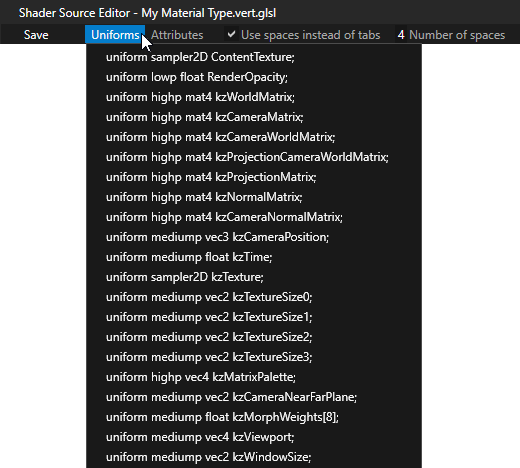
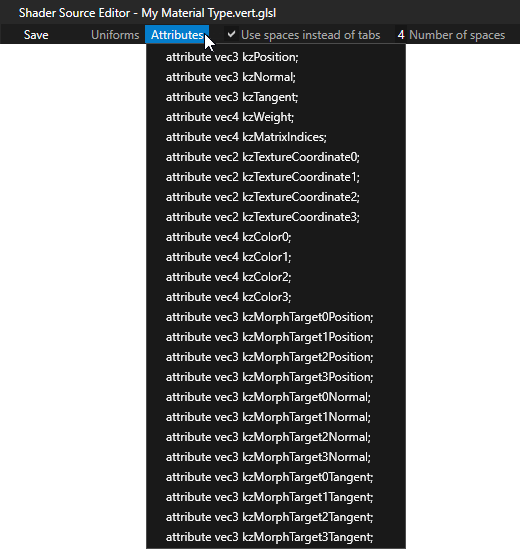
- The status bar shows messages about the status of the editor, such as when the code is saved.
- When you save a shader file, Kanzi Studio compiles it automatically. If you encounter a compiling error, you can see the error in the Log. In the Preview the objects containing materials with invalid shaders are shown in red.
Shader attributes
The input for shader programs are vertex attributes and uniforms. The attributes can vary per vertex and are provided to vertex shaders. You can use the uniforms as input to either vertex or fragment shaders.
The vertex buffer of a mesh contains also a set of attributes. These vertex buffer attributes are used for sending data to vertex shaders.
Kanzi can automatically pass attributes to shader programs, but you can configure these settings manually too.
Vertex attributes always have one of these semantics and Kanzi automatically recognizes these names:
| Attribute | Data type | Description |
|---|---|---|
| kzPosition | vec3 | Position |
| kzNormal | vec3 | Normal |
| kzTangent | vec3 | Tangent |
| kzWeight | vec4 | Weight |
| kzMatrixIndices | vec4 | Matrix palette |
| kzTextureCoordinate0 | vec2 | Texture coordinate 0 |
| kzTextureCoordinate1 | vec2 | Texture coordinate 1 |
| kzTextureCoordinate2 | vec2 | Texture coordinate 2 |
| kzTextureCoordinate3 | vec2 | Texture coordinate 3 |
| kzColor0 | vec4 | Color 0 |
| kzColor1 | vec4 | Color 1 |
| kzColor2 | vec4 | Color 2 |
| kzColor3 | vec4 | Color 3 |
| kzMorphTarget0Position | vec3 | Morph target position 0 |
| kzMorphTarget1Position | vec3 | Morph target position 1 |
| kzMorphTarget2Position | vec3 | Morph target position 2 |
| kzMorphTarget3Position | vec3 | Morph target position 3 |
| kzMorphTarget0Normal | vec3 | Morph target normal 0 |
| kzMorphTarget1Normal | vec3 | Morph target normal 1 |
| kzMorphTarget2Normal | vec3 | Morph target normal 2 |
| kzMorphTarget3Normal | vec3 | Morph target normal 3 |
| kzMorphTarget0Tangent | vec3 | Morph target tangent 0 |
| kzMorphTarget1Tangent | vec3 | Morph target tangent 1 |
| kzMorphTarget2Tangent | vec3 | Morph target tangent 2 |
| kzMorphTarget3Tangent | vec3 | Morph target tangent 3 |
You can also add custom attributes.
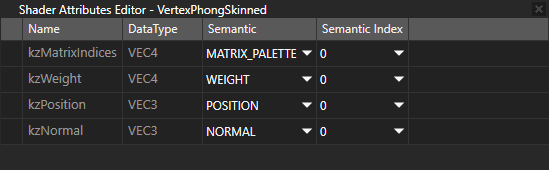
If there is a one-to-one relation between shader attributes and vertex attributes, the attributes are automatically mapped against each other. You can configure the mappings manually to work differently in mesh data. You must use manual mappings if you are using shader attribute names that are not in the default list.
To view and edit the semantics of the shader attributes of a material type, in the Library > Materials and Textures > Material Types right-click a material type and select Open Shader Attributes Editor.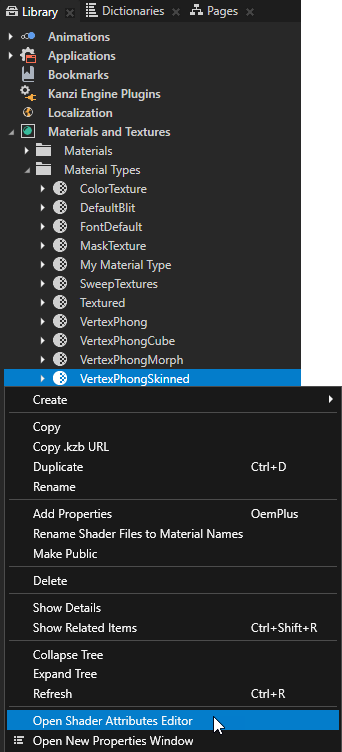
Shader uniforms
Shader uniforms can receive their data from these data sources:
- Kanzi default uniforms
- Property types defined in a material type.
If the name of the uniform matches any of the Kanzi default uniforms, Kanzi Engine automatically sends its value to the shader program. These uniforms are available by default:
| Uniform | Data type | Description |
|---|---|---|
| ContentTexture | sampler2D | A texture provided by the rendered node when rendering, for example the image displayed in an Image node. See Applying custom rendering to 2D nodes and Applying custom rendering to an Image node. |
| RenderOpacity | float | Opacity of the rendered 2D node. See Applying custom rendering to 2D nodes and Applying custom rendering to an Image node. |
| kzWorldMatrix | mat4 | A transformation matrix to transform from local coordinates to world (global) coordinates. |
| kzCameraMatrix | mat4 | A matrix to transform from world (global) coordinates to view (camera) coordinates, that is, applying camera. |
| kzCameraWorldMatrix | mat4 | Pre-multiplied matrix: kzCameraMatrix * kzWorldMatrix |
| kzProjectionCameraWorldMatrix | mat4 | Pre-multiplied matrix: kzProjectionmatrix * kzCameraMatrix * kzWorldMatrix |
| kzProjectionMatrix | mat4 | A matrix to project view coordinates into screen coordinates |
| kzNormalMatrix | mat4 | A matrix to transform object normals to world coordinates |
| kzCameraNormalMatrix | mat4 | Pre-multiplied matrix: kzCameraMatrix * kzNormalMatrix |
| kzCameraPosition | vec3 | Camera location in world coordinates |
| kzTime | float | Debug timer, 1.0f = 1000 milliseconds. |
| kzTexture | sampler2D | A texture to apply to a brush or material |
| kzTextureSize0 | vec2 | Size of the form (width, height) of the first texture in the shader |
| kzTextureSize1 | vec2 | Size of the form (width, height) of the second texture in the shader |
| kzTextureSize2 | vec2 | Size of the form (width, height) of the third texture in the shader |
| kzTextureSize3 | vec2 | Size of the form (width, height) of the fourth texture in the shader |
| kzMatrixPalette | vec4 | Array of 4x3 matrices used in vertex skinning. Each matrix is of the form:[ m00 m01 m02 translate_x] |
| kzCameraNearFarPlane | vec2 | Near and far plane distances from camera |
| kzMorphWeights[8] | float | Array of mesh weights used in morphing |
| kzViewport | vec4 |
A vector of the form (x, y, width, height) to transform from normalized device coordinates to screen (window) coordinates. Sets the viewport position and size:
|
| kzWindowSize | vec2 | Size (width, height) of the Screen node of the application |
Material uniforms
If the name of the uniform matches any of the property types defined in the material type of the shader, the value is supplied using the properties. At runtime the values for the properties are collected from the rendered material and the lights that match the light properties defined in the material type with possible property overriding.
The names and data types of the uniforms must match the names and data types of the property types in a material type. Note that the display name of a property type can be different from its real name that is used in this context. See Property types. For example, if the material type has a color property type Diffuse, the shader code must have this definition:
uniform mediump vec4 Diffuse;
The letters and the case must match in the names. These are the compatible data types from property data type to shader uniform data type:
| Property data type | Shader uniform data type |
|---|---|
| Float | float |
| Vector 2D | vec2 |
| Vector 3D | vec3 |
| Color | vec4 |
| Vector 4D | vec4 |
| Matrix 2D | mat2 |
| Matrix 3D | mat3 |
| Matrix 4D | mat4 |
| Texture | sampler1D sampler2D sampler3D sampler1DShadow sampler2DShadow samplerCube |
Uniform arrays for light property types
Light property types support uniform arrays. This enables you to use multiple lights of the same type. For example, if one shader program uses two directional lights, you must add an array property type into that shader of the material type:
uniform mediump vec4 DirectionalLightColor[2];
uniform mediump vec3 DirectionalLightDirection[2];
These property types support uniform arrays:
- DirectionalLightColor
- DirectionalLightDirection
- PointLightColor
- PointLightAttenuation
- PointLightPosition
- PointLightRadius
- SpotLightColor
- SpotLightPosition
- SpotLightDirection
- SpotLightAttenuation
- SpotLightCutoffAngle
- SpotLightConeParameters
- SpotLightExponent
Using shaders in the API
For details, see the ShaderProgram class in the API reference.
